Ads 468x60px

Pages

Tampilkan postingan dengan label to. Tampilkan semua postingan

Minggu, 23 Oktober 2016

Canon iP 1880 Reset How To

Dear all Resetters,

This is How to Reset Canon Pixma iP 1880 :
1. Press Resume button ( hold for 1 - 2 minutes )
2. Open the cover
3. Release the catridge and then put them on again
4. Close The Cover...
5. Turn Off, then Turn On

Thx to Mr Iman ( STMIK Logika ), Piya Service, Yulianto and Mas Deddy

Happy Reset

Printer Lovers
Read More..

Senin, 19 September 2016

Password n Vacation !!!

Dear All Resetters,

I wonder why still so many people ask me for password.
So I write this once again... just join our mailing list to get the password.
Its all there, just send blank email to indoreset-subscribe@yahoogroups.com
If you do not receive the password just go to files section in
our yahoogroups... its all there...
And I announce that I will take vacation for 3 weeks
I will go to Jakarta, Surabaya and also Bandung City
So... if you there and wanna meet me just email me your
mobile phones .... Im not a new guy in Indonesian IT industry
:) ..... hope to see you all soon.
**********************************************************************
Kadang saya heran kenapa masih banyak yg bertanya password ke saya
Jadi saya tulis sekali lagi, join ke mail list kita ntuk mendapatkan semua passwordnya
Cukup kirim email kosong ke indoreset-subscribe@yahoogroups.com
Jika anda tidak mendapatkan email ttg password saat bergabung
silahkan download di FILES pada web yahoogroups kami.
Juga saya umukan bahwa saya akan bepergian selama 3 minggu
ke Jakarta, Surabaya dan Bandung.
Jadi kalau kalian penasaran ingin bertemu dengan saya
cukup email saja nama dan nomor handphone....
Saya bukan orang baru kok di dunia IT Indonesia :D
Semoga bisa berjumpa dengan rekan-rekan sekalian

Salam Reset ( Happy Reset )

Printer Lovers
Read More..

Sabtu, 30 April 2016

Im Back !!!

Dear All,

Just came back from long..long...long vacation
I hope you all miss me ... he he he
but its a worthed vacation.. i met some of indoreset fans out there
and we became best friend ....
Thank you my friends you all make this vacation a very very nice vacation.
And sorry to other resetter at Surabaya, Bandung and Jakarta that I cannot meet and greet.
Coz its a business trip also.
But dont worry ... Ill be back again to those city !!!

Happy Reset

Printer Lovers
Read More..

Sabtu, 23 April 2016

How to get the password Cara gampang dapat Password

Dear All Resetters,

Now to get all the password is easier.
Just enter your email address in the box at the left corner
and press JOIN YAHOOGROUPS
just wait around 15 minutes, yahoogroups will automatically send
all the link and password.
-----------------------------------------------------------------
Sekarang untuk mendapatkan password akan lebih mudah
cukup masukkan alamat email anda di kotak sebelah kiri
kemudian tekan tombol JOIN YAHOOGROUPS
lalu tunggu 15 menit, yahoogroups akan mengirimkan secara otomatis
semua link download dan passwordnya

Have a Fun Reset

Printer Lovers ( aka indoreset )
Read More..

Selasa, 15 Maret 2016

Epson RX650 Adjustment by m4b1th

Dear All Resetters

here is download link for Epson RX 650 Adjustment Resetter

[JOIN OUR MAILING LIST TO GET DOWNLOAD INFO]


this file is provided by m4b1th from indonesia, thank you m4b1th !
for this file, no password needed .... just download and extract.

I planned to remove all password from our zip files in divshare folder.
but I still very busy right now .... be patient guys ...

Happy Reset

Printer Lovers
Read More..

Selasa, 14 Januari 2014

How to turn on Ipad Suddenly Shutdown Turn Off itself

I have this bizarre experience a week after getting my Ipad from the Apple store. What happened was when playing the Ipad suddenly shutdown or turn off by itself out of the blue. I tried to turn it on again using the power button but it wont do. Then i charged it for 8 hours as i thought the battery is weak, but still the Ipad wont turn on either.

Till then i thought there must be something wrong with the Ipad and i am starting to get worried if i have to send it to the Apple Store for fixing. I began to search the internet to search for the caused of the problem and probable solution. Fortunately i have found some info from one blog which i forgot the link. 

How to turn it on again is pretty simple: Just press and hold the power button + home button simultaneously for 10 second. The Ipad should be turn on again.


Read More..

Rabu, 08 Januari 2014

December Observations TagMyDoc—A New Way to Share Documents with Lots of Great History


also published in The Hard Copy Observer, December 2011


Observations: TagMyDoc—A New Way to Share Documents, with Lots of Great History

TagMyDoc – A New Way to Share Documents, with Lots of Great History!

In the spirit of the “Year in Review” stories the team at the Hard Copy Observer has been working on this month, I wanted to take on something similar for Jim Lyons Observations, and look back over my year or two’s worth of monthly columns to see what might jump out as worthy of further mention, especially where several (at the time) seemingly disparate items now fall together to form (a now) obvious pattern.

But then a new app for the iPhone, from a small company in Canada, came to my attention and it pulled underneath it so many different themes I have explored lately, including the following:

  • Mobile Apps and Smartphone Pervasiveness
  • Cloud Imaging and Storage
  • QR Codes
  • Social Media
  • Document Management
And it also had an historic legacy, going back in our industry, which as regular readers will recognize is one of my favorite aspects of a story as well.

It started with one of my favorite weekly features, from online tech-news source, Business Insider. On December 10, the weekly “Here Are The Best iPhone And iPad Apps You Missed This Week” by Ellis Hamburger, alerted me to the new app ScanMyDoc, and in fact had it in the second position in their coverage, right behind the long-awaited iPhone version of the extremely popular iPad app, Flipboard (see “August 2010 Observations --From the Magazine Rack and What a Difference a Year Makes!”).


Xerox Smartpaper technologies that go way back (see 1994’s NYTimes’ piece, “Technology; Smart Paper Documents For the Electronic Age”,  http://www.nytimes.com/1994/07/10/business/technology-smart-paper-documents-for-the-electronic-age.html) came to mind as I read the description of the app and its companion web-based document solution, “ScanMyDoc lets you share documents using QR codes - TagMyDoc.com is a new website that lets you print out QR codes on documents, then save them to the cloud. Using the ScanMyDoc app, anyone who scans the code on your document can instantly download it. Its a cool and secure new way to share stuff. Plus, the app keeps track of your entire QR code reading history.” (http://www.businessinsider.com/best-iphone-ipad-apps-10-2011-12#scanmydoc-lets-you-share-documents-using-qr-codes-2)
 
So much more than another QR code reader, this seemed to be a fully thought-out solution from Montreal-based Knova Web Technologies. I downloaded the app, sought out the TagMyDoc.com website and uploaded a Word document, retrieved and printed it complete with its identifying QR code, and was able to use the iPhone to retrieve it from the cloud, all in just a few minutes. I had to find out more!

A good email exchange with Knova principals Gabriel Deschenes, CEO, Julien Leroux, Marketing Director of TagMyDoc and JP Desjardins, Communication Director, follows, as they responded to my questions via email.

___________________

JLO: How did you come up with the idea for the solution?

Knova: In a digital world, it is surprising that the process of sharing physical document is still quite tedious (anyone used a scanner recently ?). We wanted to find a way to make the paper document sharing process simpler and easier.

Before TagMyDoc, here was no way of sharing printed documents with people unless you sent them to a link to a server that hosted the original file. Even with today’s shortened links, remembering any URL can be difficult since it is easily forgotten once you need to get the document.  You can still share it with Facebook, Twitter, [see “Observations September 2009: Document Management with Twitter? A Start Anyway”], or email.  But to open the door for real-life sharing of documents, we used the QR code to tag the documents because it is the easiest and most popular barcode in the world [see “January 2010 Observations -- From the QR Code sandbox — and will QR Codes help printing?”].


 TagMyDoc.com uses history to describe their highly evolved document management scheme

So one day we come up with an idea, lets create an app that automatically tag some documents with QR codes that link to the doc you have in the front of your eyes. That is why we built a tool to easily tag your documents and provide people with your tagged document, a public link to it and the QR code pointing to your document. With this system, people can simply scan the tag to download the docs.

JLO: Do you have a few "use cases" where the solution really shines?

Knova: A lot of people are doing some presentations all around the world right now. Those people have others who want the presentation documents, typically PowerPoint. Since they didn’t have TagMyDoc when needed, they had to send emails with attachments to each of those wanting it.

You can expect presence in schools also, and we have a couple of stealth projects that we prefer to keep it for us for the time being. Expect partnerships, extensions to popular software and applications and further implementation of document management in your daily life.

JLO: What is the future, including how do you make money?

Knova: We aim to have as many users of our service as possible by making TagMyDoc the easiest way to share documents in the digital as well as in the real world.

For pricing plans, you can go see for yourself at http://tagmydoc.com/register. We also plan to provide solutions for businesses that will allow them to make use of the TagMyDoc platform into their own segregated network. It offers more cloud storage, enhanced features, add-ins etc...

Another neat addition for Premium users is the ability to batch-tag documents. With testing from the development team, we were able to tag 150+ documents in one batch upload without any hiccups, just to show the power of the TagMyDoc platform.

For the beta launch of TagMyDoc, a Premium account is only $1.99/mo and a Premium Plus account is only a buck more at $2.99/mo. We believe in micro-payments for our customers so that’s why these are incredible prices for the features you get. We plan to support the other popular Office application, Microsoft Excel [in addition to the “coming soon” Word and PowerPoint add-ins]. Tagging Excel files will be very easy. An added benefit of Excel is that you will be able to specify the cell and column of your tag instead of selecting between corners. We plan to make further integration with ScanMyDoc, our QR code scanner, the fastest one in the App Store.

JLO: Do you have plans to work with other cloud storage sites or document repositories (Scribd comes to mind – see “Observations May 2008 – Scribd, the YouTube for Documents?”)?

Knova: TagMyDoc’s primary use is to tag documents as mentioned. Because of wanting to keep track of your documents, it became a hosting service as well. It quickly became more important for us to make this a hosting service without neglecting the tagging that goes on, so we added features like folders for organizing your documents, sharing documents, sharing folders, deleting documents and folders, renaming folders, password-protecting documents, settings, batch uploading, versioning of documents. Because people see Scribd, Dropbox, Box.net as a general file hosting and sharing service, we can’t say that we are in the same space. But we are already being approaches by some of those to add the TagMyDoc solutions to their applications, so for sure we are looking for a partnership but waiting for the most valuable for us and the other companies.

JLO: Are you familiar with past efforts in printing/document management that have inspired or offered "how not to do" insight (Xerox Smartpaper comes to mind in this case)?

Knova: Yes, we took a look to previous inventions that were done in the printing/sharing documents industry. Especially when you’re making a patent, you have to look to the art within from other patents in your domains. So then we knew about what was available before TagMyDoc and how it is different from the others’ inventions. The things we always founds with other inventions such as Xerox Smartpaper, is that there was a big education of the market to be done, people need to act in a different way and buy other instruments to benefit from the inventions.

TagMyDoc use technology such as QR codes, which is the most commonly known and used 2D tag, it also depends on Smartphone and cloud computing. To benefit from TagMyDoc, we wanted peoples to use technology that they already know and use and most importantly, like! At the beginning we were thinking about creating 2D tags that can be only read by our own QR reader app, Scanmydoc. But we judged that this was a “how not to do it” way, even if we would have more Scanmydoc users by now. We are thinking long term and this way it is making this app easy to use and practical for everyone.

___________________

As of two weeks following the Business Insiderreview, the ScanMyDoc app still has not warranted a user rating or review, but as the Knova executives acknowledged, these solutions take some time for education and awareness, even in the case of building upon existing standards. It is an appealing solution to me, if only because it incorporates some many technologies and solutions I have covered in the past several years. It is also interesting in revealing changing industry priorities – for example launching the smartphone-based solution first, with the Microsoft Office versions to follow – not something that would always have been the case! It will be interesting to keep an eye on this firm and its apps/solutions to see how things develop!
Read More..

Senin, 14 Oktober 2013

How to setup OpenDNS

 The job of a DNS server is to translate web address (like www.yahoo.com) into a computer-readable number also known as an IP address (209.131.36.158). Once your computer knows the IP location of a web domain name, it opens the website in your browser.

DNS servers are provided by ISP (like PLDT DSL, GLOBE DSL, and alike) but if the DNS server of our ISP is slow it would take time for the server to translate the web address that adds up to the overall loading time of the website. And this is the time you will experience slow browsing.

To solve this problem, i will teach you on how to setup OpenDNS, a simple and reliable service that speeds up your Internet connection and also handles some other very important issues. There are no software to install, it’s very easy to set up at no cost.

Follow this steps on how to setup OpenDNS and make your web browsing safer, faster,and more reliable

For Microsoft Windows XP, 2000

   1. Open control Panel
   2. click Network Connection
   3. Right click on Local Connection Properties then select Properties
   4. on “General Tab” select Internet Protocol (TCP/IP) then click Properties


   5. Click "Use the Following DNS server addresses"
   6. Change your DNS Server addresses to 208.67.222.222 and 208.67.220.220 and click OK.

For Microsoft Windows Vista and Windows 7
   1. Open Control Panel
   2. Network and Sharing Center
   3. Click on Change adapter Setting

   4. Right Click on Local Area Connection then select Properties

    5. Scroll and double click Internet Protocol Version 4 (TCP/IPVv4)
6. Select Use the following DNS server addresses: and input to
Preferred DNS Server: 208.67.222.222
Alternate DNS server: 208.67.220.220
 For EASY SETUP you can use the COMMAND prompt:

   1. Run
   2. cmd – this will open your command prompt
   3. And type the following

    netsh interface ip set dns “Local Area Connection” static 208.67.222.222
If you want to block adult content like porn use: 208.67.222.123 and 208.67.220.123
Read More..

Minggu, 13 Oktober 2013

How to reset Brother MFC printer

 This Reset Procedure is for Brother MFC Series Printer

Problem: Brother MFC Printer display "unable to clean" or Error 46
Solution: 

  • First turn of the printer
  • Switch on the machine while holding down the menu button until all the leds are flashing on/off. Now you are in “maintenance” mode.
  • Press 80
  • Press the “mono start” button several times until you see “purge: xxxx”
  • Press “2783” in order to reset the purge counter. You will see: “purge:0000”
  • Press the "stop" button.
  • Press “99” to exit the maintenance mode.
and you are done!
Read More..

Kamis, 10 Oktober 2013

How to use Combofix

 
Combofix is a freeware portable application created by sUBs, it was designed to scan a computer for known malware & spyware and, if found, attempt to automatically clean the infection. It s a effective cleaning tool, which is useful compared to other malware and spyware removers. I use this application very frequently in removing nasty Antivirus 2008 and its variants. In addition it also shows you a log files that you can use to search and remove infections which are not automatically removed.

Malware, short for malicious software, is software designed to infiltrate a computer system without the owners informed consent. The expression is a general term used by computer professionals to mean a variety of forms of hostile, intrusive, or annoying software or program code. -Wikipedia
Spyware is a type of malware that can be installed on computers  and collects little bits of information at a time about users without their knowledge. The presence of spyware is typically hidden from the user, and can be difficult to detect.

How to use combofix:
  • Disable or Close all anti-spyware, anti-malware, antivirus, real-time protection, which may affect ComboFix.
  • Close all running programs of your computer
  • Double click ComboFix.exe on you desktop
  • When Combofix finished, it will create logs for you. 

You can download Combofix Here.
A detailed usage instructions can be found on the official site.

Warning: ComboFix is extremely powerful , You should not run ComboFix.exe unless you know what you are doing. Use ComboFix at your own risk. 
Read More..

How to Fix Windows System32 config system file missing or corrupt


When you start your Windows XP-Based computer, you may receive the following error message:

Windows could not start because the following file is missing or corrupt:
Windowssystem32configsystem
You can attempt to repair this file by starting windows setup using the original setup CD-ROM.
Select r at the first screen to start repair.

This problem may occur if "system" file is missing or corrupted:

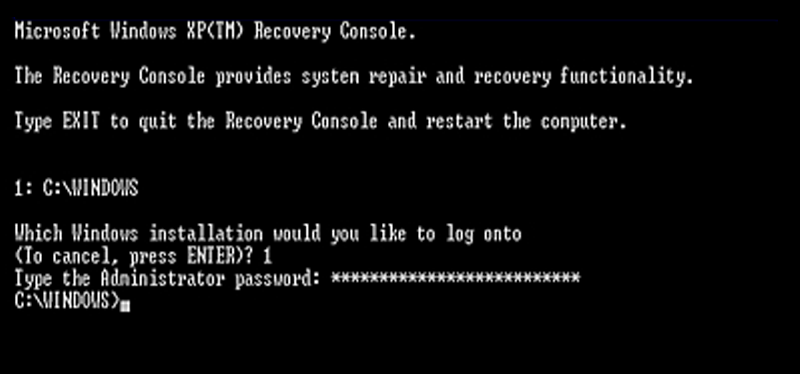
To resolve this issue, you need an original or untouched copy of windows XP, and  configure the computer to boot from the CD-ROM or DVD-ROM drive and follow this steps.

1. Insert the Windows XP bootable CD into the computer.
2. When prompted to press any key to boot from the CD, press any key.

3. Once in the Windows XP setup menu press the "R" key to repair Windows.

4. Log into your Windows installation by pressing the "1" key and pressing enter.
5. You will then be prompted for your administrator password, enter your password is you have any, otherwise just press Enter.
6. At the command prompt type:
copy  %windir%Repairsystem  %windir%System32Config
 7. If prompt to overwrite the files just type "y" and hit enter. Once the file have been successfully copied, remove the CD from the computer and reboot.

Note: Once successfully booted to windows, you will notice that some of your drivers are not installed. Dont worry its normal when doing this repair procedure, Just reinstall your device driver and your done!

If you found this helpful, please leave a comment.
Read More..

Senin, 07 Oktober 2013

Create Hotkey To Safely Remove USB Drive

Normally we remove USB Storage Device by Clicking "Safely Remove Hardware" Icon residing in our System Tray. For me its very annoying specially if you are in internet cafe business where a lot of customer bring a flashdrive with documents to print. And you have to Safely Remove the device for each and everyone in a tiresome way. So to make our life a little bit easier let do a small hack to Launch "Safely Remove Dialog Box" by Creating Shortcut or by assigning Hotkey.

To Create a Shortcut to the Safely Remove USB Devices:

1. Right-click on the desktop and choose New -->Shortcut
2. Then paste in the following into the location box:
Rundll32.exe shell32.dll,Control_RunDLL hotplug.dll
3. Next Give a Shortcut name.

To Assign a HotKey:

1. Right-click on the Created Shortcut icon.
2. Open the properties dialog, then go to the Shortcut tab.

3.  Now Assign a Shortcut key (Here i have assigned CTRL+ALT+Down).
4.  Close the dialog box.

Now you have a hotkey that  launch of Safely Remove Dialog Box.
Read More..

Sabtu, 05 Oktober 2013

How to activate windows 7 GodMode

GodMode is a folder that brings together a long list of customization settings allowing you to change all your settings from one place. Its very easy to enable and useful if you tweak things around a lot.

Step 1: Right click on your desktop.
Step 2: Create New folder.
Step 3: Name your new folder with this without the quote, "GodMode.{ED7BA470-8E54-465E-825C-99712043E01C}" and press enter.
Step 4: Open the folder.

Read More..

Sabtu, 28 September 2013

How to Remove Bios Password for Acer Laptops


If you key in the wrong Supervisor password three times, an error code is generated and system is disabled like in the image below.

To unlock the BIOS, perform the following steps:
   1. On a different machine, run the BIOS_PW.EXE file along with the error code generated. For example:
        bios_pw 14452 0
   2. Four ASCII strings are generated as output. Select and note down any one of the strings.

   3. Reboot the machine with the locked BIOS and then use either any of the strings as the BIOS user
       password.

Read More..

Jumat, 27 September 2013

Stop Annoying pop up to upgrade to Avast v5 0

 For those who would like to get rid of the annoying "NAG" window for version 5 update, do the following:

1. Disable the self-defense module. To disable the avast! Self-defense module:
Right click avast! tray icon --> program settings -->Troubleshooting tab --> check- Disable avast! self-defense module
2. Locate and rename the file "asw5Not2.exe". It should be located in the Avast4 folder.
3. Re-enable the self-defense module.

This was apparently part of a virus definition update, even though it has nothing to do with virus definitions.
Read More..

Kamis, 26 September 2013

How to fix Windows XP Activation Loop


Do you encounter a windows XP activation loop? Where it continually ask you to activate windows, but the activation wizard will tells you that it is already activated.

What you need: Untouched Windows XP Disc Installer or Original/Backup copy of windowsXP Disc

I always encounter this problem everytime I repair-install a Windows XP system. So here is what I did to fix the problem. First restart your PC then

1.) Log onto Windows using SAFEMODE with command prompt.
2.) Wait until the windows boot then Type "explorer" in the command prompt.
3.) Explore Windows XP CD and copy the TOOLS folder (located at support folder) to C:
4.) In the TOOLS folder extract the DEPLOY.cab (this will create a new folder called deploy).
5.) Open the DEPLOY folder and run SYSPREP.
6.) Click FACTORY button. Notice that your PC will shut down.
7.) Power on your PC and wait till the windows desktop screen appear.
8.) Once finish Click RESEAL button and wait. Notice that your PC will shut down again.
9.) Power on again your PC and your done.

You may also be able to use the fix from Microsoft here
Read More..

Rabu, 25 September 2013

How to Change Desktop Wallpaper in Windows 7 Starter


Windows 7 Starter is the edition of Windows 7 that contains the fewest features. You cant have Aero theme in this version. You cant change desktop wallpaper, Screen Saver, Themes and Visual Style. In fact, you dont see "Personalize" menu in desktop context menu.

With this "Personalization Panel" created by HB860 for Windows 7 Starter and Home Basic Editions brings Personalize Panel of Windows 7 Ultimate Edition to low-end restricted editions.

It allows you to:

    * Change Desktop wallpaper
    * Theme support
    * Aero glass support
    * Desktop context menu integration
    * Change window and taskbar color
    * Portable version also available

Read More..

Selasa, 24 September 2013

Add Tab Feature to MS Windows Explorer


QTTabBar is extension for Windows Explorer that brings tabbed browsing to Microsofts file browser, along with a host of other great features.

Once installed, you can add it to Windows Explorer by going to "View -> Toolbars" menu and select QT TabBar or right-clicking on Menubar and select QTTabBar


 Features
  • Now works in Windows 7 as well
  • Desktop Bar restored for XP/Vista
  • F2 rename selection functionality restored
  • "Use old ListView control" option enabled
  • "Display column headers in all views" option enabled
  • General stability improvements
  • Tabbar/Toolbar positioning now works correctly on XP
  • Search box no longer mysteriously shrinks when focused
  • Full Row Select can be enabled/disabled when the SysListView32 is used
  • Libraries can be dropped into
Read More..

Minggu, 22 September 2013

How to disable store demo mode in Samsung LCDTV


What is Store Demo Mode or Shop Mode?

Essentially, Shop Mode or Store Demo Mode returns the TV automatically to its default settings in thirty minutes. It is usually used by retailers who want to demonstrate functions to customers, and then want the TV to return to its default settings without the bother of manually resetting the TV.

Easy FIX in removing your Samsung LCDTV from Shop Mode or Store Demo Mode. First, confirm your TV is in Shop Mode or Store Demo Mode:

1. Press the INFO button on your remote control. A list of settings appears.
2. See if the Picture Mode setting is set to Shop Mode or Store Demo Mode.

There are three methods for removing your TV from Shop Mode or Store Demo Mode. If the first method does not work, try the second or third method.

Method 1
  1. Press the Volume button on the side panel of your TV. If your TV does not have a side panel, press the Volume button on the front panel. The TV displays the volume bar.
  2. Press the Menu button on the side panel of your TV for about seven seconds. Again, if your TV does not have a side panel, press the Menu button on the front panel. If Dynamic or Dynamic Mode is displayed on the screen, your TV has been removed from Shop Mode or Store Demo Mode.
Method 2
  1. Press the Volume button on your remote. The TV displays the volume bar.
  2. Press the Menu button on the side panel of your TV for about seven seconds. Again, if your TV does not have a side panel, press the Menu button on the front panel. If Dynamic or Dynamic Mode is displayed on the screen, your TV has been removed from Shop Mode or Store Demo Mode.
Method 3
  1. Press and hold the Volume button on your TV. The TV displays the volume bar.
  2. As you are holding the Volume button, press the Menu button on the side panel of your TV for about seven seconds. Again, if your TV does not have a side panel, press the Menu button on the front panel. If Dynamic or Dynamic Mode is displayed on the screen, your TV has been removed from Shop Mode or Store Demo Mode.
Note: You may want to press the INFO button on your remote again to confirm you TV is no longer in Shop Mode or Store Demo Mode.

Source: Neowin
Read More..

How to Create QR Code with Goo gl


QR codes have become quite a norm with newspapers, websites and magazines where people are asked to click a picture and read the QR code to perform certain actions. Now you will be able to do the same without having to worry about using software to create the codes.

Google publicly launched their URL Shortener with extra feature where you can convert a URL to QR code which can then be read by a mobile device.

To create a QR code with Goo.gl, just shorten the URL and add ".qr" to the end of it.
For example http://goo.gl/UQDfJ  is the shortened URL for http://tipsterhub.blogspot.com, adding .qr to the URL ( http://goo.gl/UQDfJ.qr) will display the QR code which you can then download and add to your webpage or application.

Source: Techie-Buzz.com
Read More..