Ads 468x60px

Pages

Tampilkan postingan dengan label in. Tampilkan semua postingan

Sabtu, 17 Desember 2016

Divshare limit ! C90 resetter trial in new place

Dear All Resetter,

We have problem with our download area in Divshare.
Since divshare is now limit the bandwith for free members :( ouch
and of course we are over limit already :)

so guys, we are now trying new places...that are still free
and also as I promised there is NO PASSWORD for this files

now i already upload only c90 resetters ( both version )
in mediafire .... if u have any opinion where the ideal place for our resetter
plz let me know :) just post in the comment or email me directly
at indoreset@yahoo.co.id
( the places must be unlimited bandwidth and unlimited file lifetime )

so here is the "trial" places for c90 resetters, enjoy
- indonesian version :
[JOIN OUR MAILING LIST TO GET DOWNLOAD INFO]

- singapore version :
[JOIN OUR MAILING LIST TO GET DOWNLOAD INFO]


plz do try the download area and tell me what you think ...

Happy Reset

Printer Lovers
Read More..

Senin, 26 September 2016

New Moderator in TOWN !

Please Welcome Our new Moderator

Felix ...... and also a already fixed our YAHOO Presence in this blog ... so plz feel free to ask

and for you that still asking about our mailing list is = indoreset@yahoogroups.com

to join is very simple, send blank mail to = 
                                     indoreset-subscribe@yahoogroups.com
to unsubscribe is simple too, send blank mail to = 
                                   indoreset-unsubscribe@yahoogroups.com

happy reset

ndry
Read More..

Kamis, 04 Agustus 2016

Canon Resetter Warehouse Gudang Canon Resetter

Just Another Resetter Collection

i350, IP1000, IP1100 IP1880 IP2500, IP1300 IP1700, IP1500, IP1200 IP1600 IP2200, MP Tool v.094, MP Tool v.092, IP Tool v.114, IP Tool v.115, Canon IP2270

join our free INDORESET FORUM !

enjoy!

felz
Read More..

Senin, 25 Juli 2016

Holy Week Greetings!

Have a peaceful Holy Week to everyone...

From: the Moderators
Read More..

Selasa, 24 Mei 2016

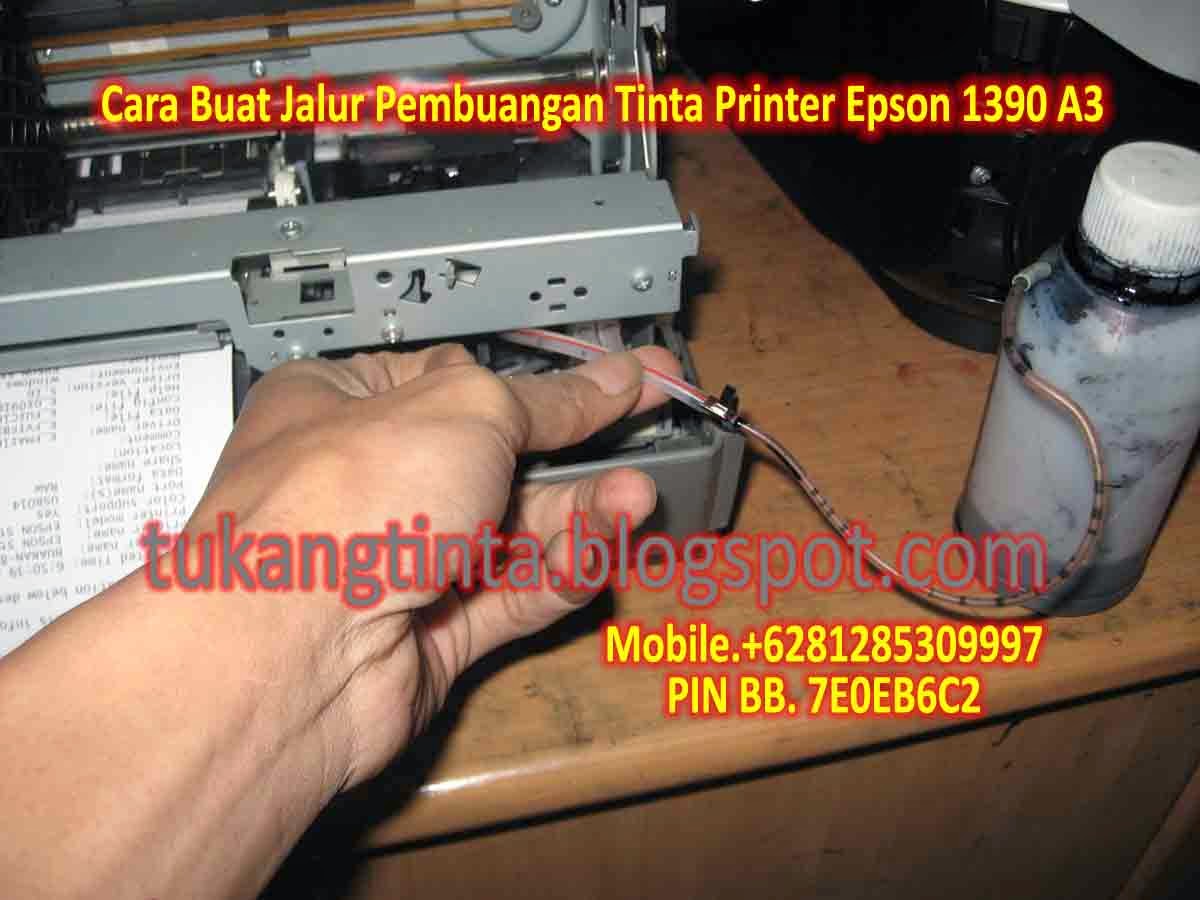
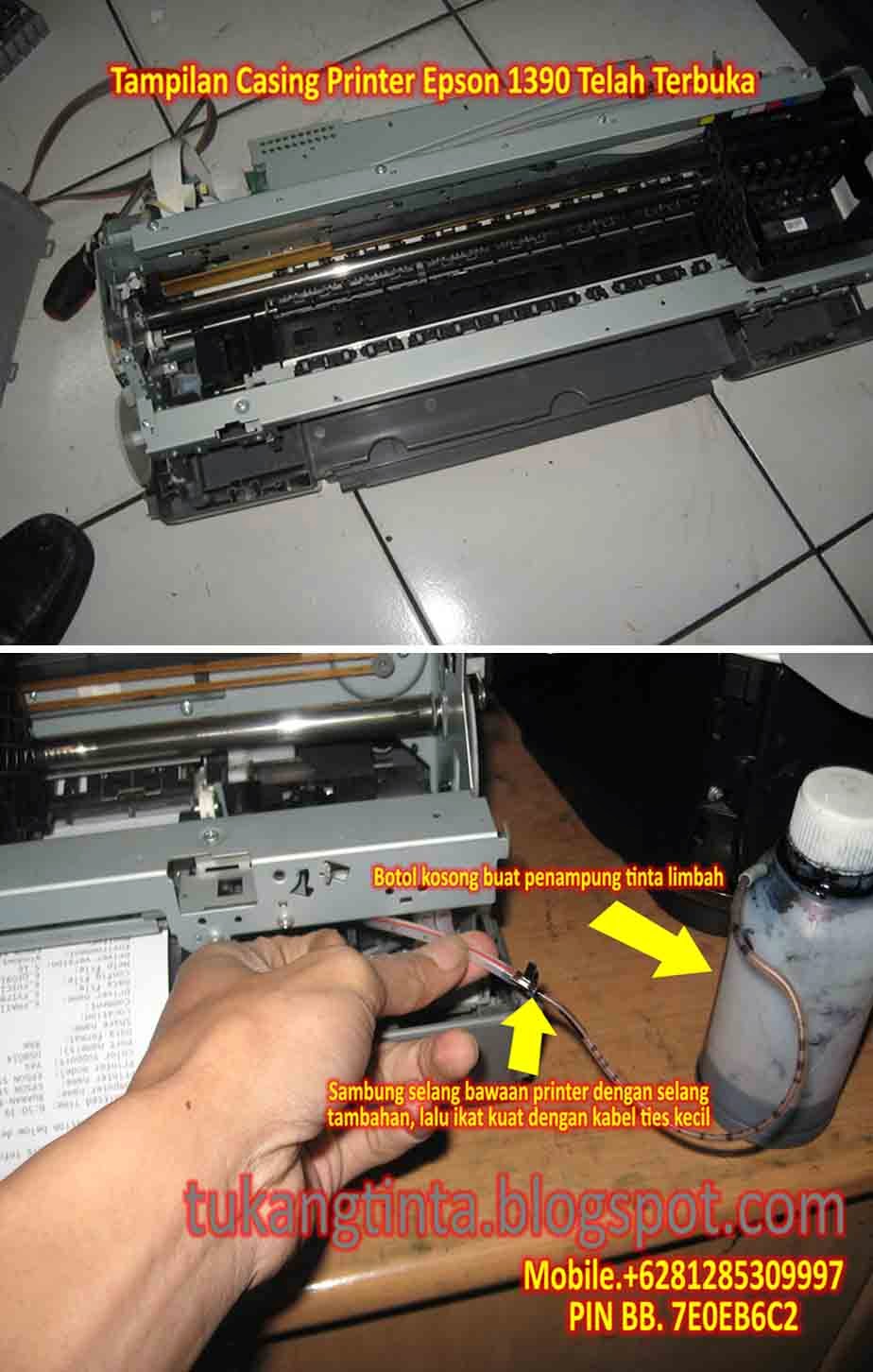
Cara Buat Jalur Pembuangan Tinta Printer Epson 1390 A3

http://tukangtinta.blogspot.com/
Hello Sobat, Kali ini Bang Mone dari TukangTinta.Com ingin membagikan pengalaman tentang " Cara Buat Jalur Pembuangan Tinta Printer Epson 1390 A3 ", perlu diketahui sobat dimana didalam mesin printer kita ada namanya bak atau busa penampungan tinta limbah dan penampungan tinta limbah akan penuh pada waktunya tergantung aktivitas pemakaian sobat. saat ini Bang Mone ingin berbagi bagaimana cara buat jalur pembuangan tinta limbah pada printer Epson 1390 A3, Langsung saja sobat lihat langkahnya dibawah ini :

Langkah Awal, siapkan peralatan yang dibutuhkan seperti :
  1. Obeng Plus.
  2. Obeng Min.
  3. Gunting.
  4. Selang Tambahan.
  5. Lakban Hitam.
  6. Botol Kosong.
  7. Kabel Tis Kecil.
  8. Bos Infus Uk.3.0 Inch atau Solder Listrik.
http://tukangtinta.blogspot.com/

Pertama buka casing printer sobat dahulu dengan benar, setelah casing printer terbuka, lalu kita cari selang pembuangan limbah bawaan printer kemudian sobat sambung dengan selang tambahan lalu ikat dengan kabel tis kecil, setelah selesai sobat lubangi bagian samping atau dibelakang casing printernya dengan Bor Infus Uk.3.0 Inch atau dengan Solder Listrik, setelah langkah akhir selesai sobat rakit dan pasang kembali casing printer seperti semula lalu tinggal pasang jalur selang yang telah dibuat dimasukkan dibotol kosong.


Selesai.


Sekian artikel Bang Mone dari TukangTinta.Com mengenai " Cara Buat Jalur Pembuangan Tinta Printer Epson 1390 A3 ", Semoga dapat bermanfaat, berguna dan menginspirasi sobat semua.

> Download Driver Printer Epson 1390 A3 klik disini

Salam,
Bang Mone dari TukangTinta.Com
www.tukangtinta.com
Mobile.+6281285309997
PIN BB 7E0EB6C2
Read More..

Jumat, 11 Maret 2016

New Canon Resetter 2010

This is the latest resetter for canon MP198, MP258, MP276, MP496, MP558, MP568, and MP648.

The following are the steps that must be done:


  1. Turn on the printer to service mode. how to enter service mode is :
  • While the printer is OFF, press and hold the Start/Stop button (Resume/Cancel in some other models).
  • While holding the Start/Stop button, press and hold the POWER button.
  • When the POWER LED (green light) lit, release the Start/Stop button (still holding the POWER button).
  • Press the Start/Stop button TWICE (still holding the POWER button)
  • Release the POWER button.
  • Wait for the LCD to display 0 (zero).
  1. After the display is 0, attach the printer usb cable to pc, then there will be detected new device (its normal)
  2. Run service_tool 1050.exe
  3. Confirm detected usb-port numbers on usb port column.
  4. Click the MAIN ink counter reset button, make sure there is paper in the paper feed, because the printer will print after the process is complete.
  5. Click platern ink counter reset button, the printer will print again.
  6. Turn off the printer.
  7. Your printer is ready for use again.


HERE IS THE DOWNLOAD LINK

JOIN FREE INDORESET FORUM


Enjoy!

felz
Read More..

Rabu, 25 September 2013

How to Change Desktop Wallpaper in Windows 7 Starter


Windows 7 Starter is the edition of Windows 7 that contains the fewest features. You cant have Aero theme in this version. You cant change desktop wallpaper, Screen Saver, Themes and Visual Style. In fact, you dont see "Personalize" menu in desktop context menu.

With this "Personalization Panel" created by HB860 for Windows 7 Starter and Home Basic Editions brings Personalize Panel of Windows 7 Ultimate Edition to low-end restricted editions.

It allows you to:

    * Change Desktop wallpaper
    * Theme support
    * Aero glass support
    * Desktop context menu integration
    * Change window and taskbar color
    * Portable version also available

Read More..

Minggu, 22 September 2013

How to disable store demo mode in Samsung LCDTV


What is Store Demo Mode or Shop Mode?

Essentially, Shop Mode or Store Demo Mode returns the TV automatically to its default settings in thirty minutes. It is usually used by retailers who want to demonstrate functions to customers, and then want the TV to return to its default settings without the bother of manually resetting the TV.

Easy FIX in removing your Samsung LCDTV from Shop Mode or Store Demo Mode. First, confirm your TV is in Shop Mode or Store Demo Mode:

1. Press the INFO button on your remote control. A list of settings appears.
2. See if the Picture Mode setting is set to Shop Mode or Store Demo Mode.

There are three methods for removing your TV from Shop Mode or Store Demo Mode. If the first method does not work, try the second or third method.

Method 1
  1. Press the Volume button on the side panel of your TV. If your TV does not have a side panel, press the Volume button on the front panel. The TV displays the volume bar.
  2. Press the Menu button on the side panel of your TV for about seven seconds. Again, if your TV does not have a side panel, press the Menu button on the front panel. If Dynamic or Dynamic Mode is displayed on the screen, your TV has been removed from Shop Mode or Store Demo Mode.
Method 2
  1. Press the Volume button on your remote. The TV displays the volume bar.
  2. Press the Menu button on the side panel of your TV for about seven seconds. Again, if your TV does not have a side panel, press the Menu button on the front panel. If Dynamic or Dynamic Mode is displayed on the screen, your TV has been removed from Shop Mode or Store Demo Mode.
Method 3
  1. Press and hold the Volume button on your TV. The TV displays the volume bar.
  2. As you are holding the Volume button, press the Menu button on the side panel of your TV for about seven seconds. Again, if your TV does not have a side panel, press the Menu button on the front panel. If Dynamic or Dynamic Mode is displayed on the screen, your TV has been removed from Shop Mode or Store Demo Mode.
Note: You may want to press the INFO button on your remote again to confirm you TV is no longer in Shop Mode or Store Demo Mode.

Source: Neowin
Read More..

Senin, 22 Juli 2013

Epson C44ux Parts in your printer have expired their service life


All Epson printers are set to so many thousand prints, once this has reached the end this message appears.

It is necessary to reset the counters with "SCC Utility":

http://inkjetprinterhelp.us/epsonSSC.html

Cartridges:
T036140: Ink Black 10ml
T037040: Ink Color 
Read More..